Plans and models
“Add a door between the kitchen and hallway.” Work on walls, rooms and openings. Return to the 2D plan and 3D model to see the result.
Kaldrix plugins and integrations
Ask your assistant to change a floor plan, check quantities or price the work. Connect a supported assistant to your account. Connection availability in ChatGPT or Claude depends on the provider and its plan.
Turn a conversation into action
After you grant access, your assistant will use data saved in Kaldrix. View changes made through the plugin in the app, or continue a conversation from a project you started in the app.
“Add a door between the kitchen and hallway.” Work on walls, rooms and openings. Return to the 2D plan and 3D model to see the result.
“Check the wall area to be painted.” Use quantities from the model and find elements that have not yet been priced.
“Price the finishing work using my price list.” Combine quantities with materials and labour, prepare a PDF and review the offer before sending it.
“Show delayed stages and record plastering at 60%.” Check dates and progress. Set stage order and dates in the app.
“Show Linden House documents and prepare an estimate PDF.” Find files with the right build and return to them in the app.
“Prepare a material list from the estimate.” See the quantities and costs you need to plan purchases.
A Kaldrix plan includes a limit for operations through plugins. Access to ChatGPT, Claude or another AI assistant, and its cost, depend on the provider. These are billed separately.
Files with the right context
Link folders to a company or project. Keep contracts, photos, technical documents and other files in order throughout the build.
Google Drive
Link a folder to a project so you can return to the documents for that build. Drive access requires a separate account connection.
Dropbox
Link the appropriate folder to a project. The document list helps you return to the right files with their context.
Records for settlement
The connection is for downloading and organising company invoices from Poland’s KSeF system. Assign records to projects and stages, track payments and compare costs with your estimate.
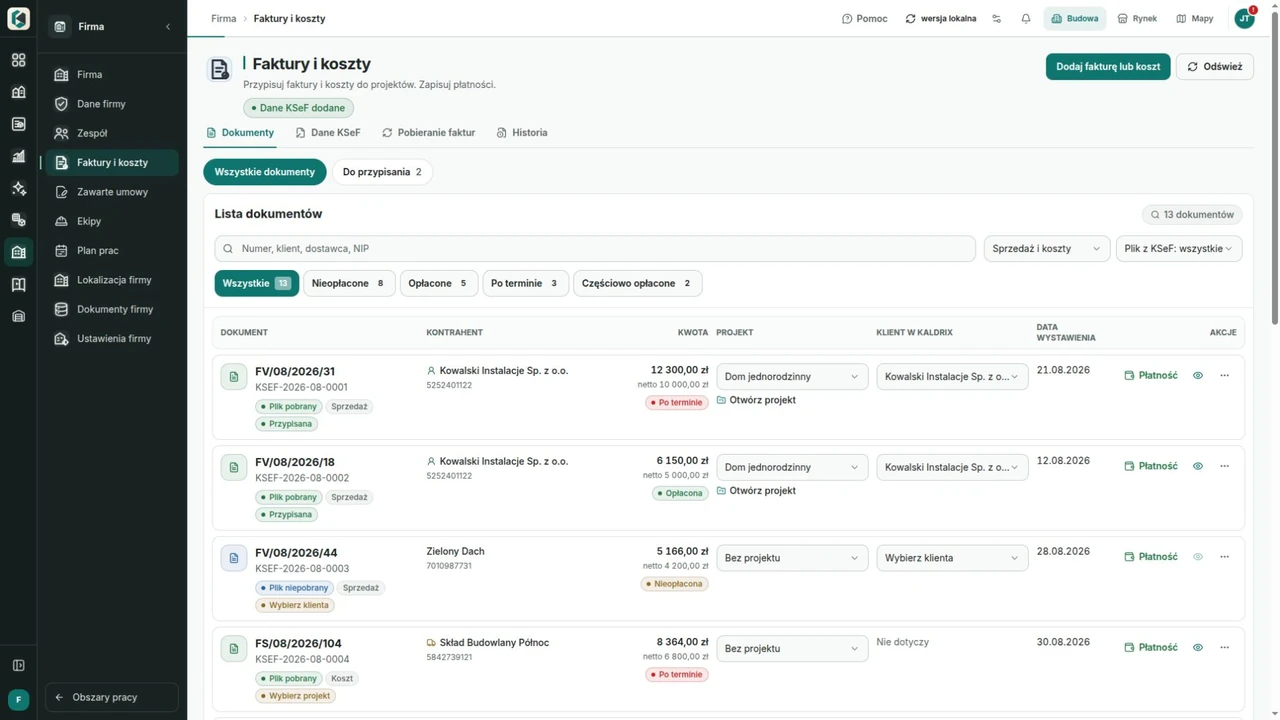
Fill in business details from Poland’s public VAT whitelist and CEIDG register. Check the returned details before using them.
Kaldrix does not issue invoices or send them to KSeF. It can prepare suggested invoice details for you to use in your own invoicing software.
Your account. Your decisions.
Your assistant works within your permissions and the access you grant. Deleting data or sending an offer requires separate confirmation. Check the action before you approve it.
Check whether you can connect the Kaldrix plugin to ChatGPT or Claude. Availability depends on the provider’s rules and plan.
Connect your account and choose your assistant’s permissions. You can remove the connection later in ChatGPT or Claude settings.
View the result in your project. Before deleting data or sending an offer, check what will happen and confirm the action.
14-day trial, no automatic payments
Create an account, add a project and try the drawing, estimate and schedule during a 14-day trial. No automatic payment.
Tell us what your company or building project needs.